Z. M. Williams - 22nd February 2025
"Fantastic, I've just finished this extensive project. Now all I have to do is document it!" I thought after pushing the latest version of my latest C++ project.
Needless to say, it is not that simple (or is it). I had previously written documentation for Python and pushed it to ReadtheDocs with Sphinx and had previously tried to host a C++ project on the same site but never quite got it to work properly. I had built the documentation with Doxygen but couldn't get them working together.
Finally I have documentation for three projects up and running. A Python program, a simple C++ library with a C API, and a big C++ project. Each of these has been implemented slightly differently. So I will go through each one individually.
Both Sphinx and ReadtheDocs are designed primarly for Python so should be easy. ReadtheDocs does have a nice tutorial but it is written assuming you already have the example project setup.
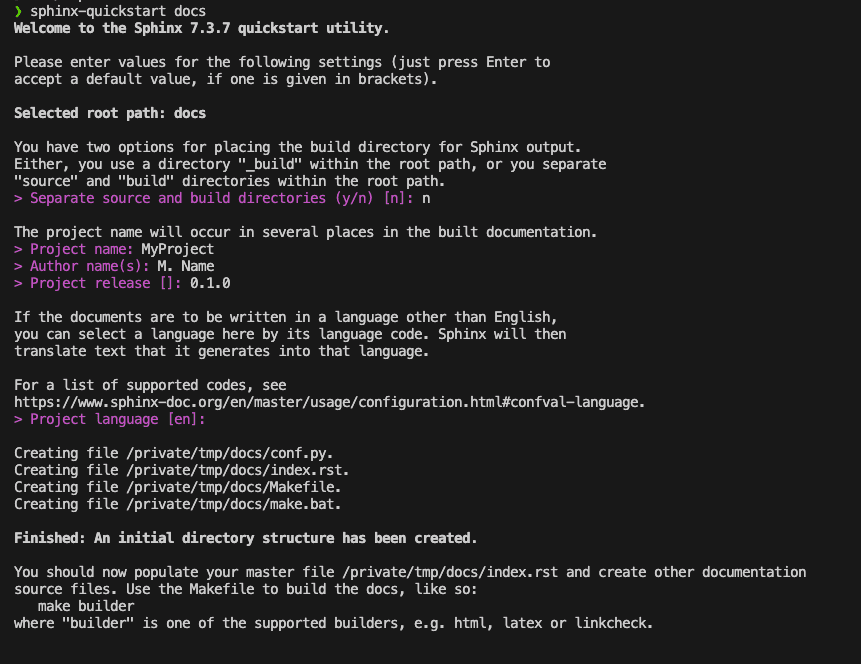
For your own project, to setup the documentation in directory docs,from the root directory, run:
sphinx-quickstart docs/
This script will guide you through the options for initialising a documentation directory (see image).
For most of these options the defaults are fine but give the project
a name, an author name, and a version. The script creates four files
and three empty subdirectories. Of the four files, Makefile and
make.bat are scripts for building the documentation, index.rst is
the "frontpage" of the documentation, and conf.py is the Sphinx
configuration. The configuration file conf.py, should look
something like:
# Configuration file for the Sphinx documentation builder.
#
# For the full list of built-in configuration values, see the documentation:
# https://www.sphinx-doc.org/en/master/usage/configuration.html

# -- Project information -----------------------------------------------------
# https://www.sphinx-doc.org/en/master/usage/configuration.html#project-information

project = 'MyProject'
copyright = '2025, M. Name'
author = 'M. Name'
release = '0.1.0'

# -- General configuration ---------------------------------------------------
# https://www.sphinx-doc.org/en/master/usage/configuration.html#general-configuration

extensions = []

templates_path = ['_templates']
exclude_patterns = ['_build', 'Thumbs.db', '.DS_Store']


# -- Options for HTML output -------------------------------------------------
# https://www.sphinx-doc.org/en/master/usage/configuration.html#options-for-html-output

html_theme = 'alabaster'
html_static_path = ['_static']
This includes the project details, a list of sphinx extensions, the templates path, paths to exclude, the theme for building html, and path for static files to customise the html output. The html documentation may then be built using
python -m sphinx -T -b html -d _build/doctrees -D language=en . _html
from inside the docs directory. This will output the documentation
to the directory docs/_html. I recommend adding this to
.gitignore along with docs/_build.
To use the ReadtheDocs theme rather than the default, set:
html_theme = ["sphinx_rtd_theme"]
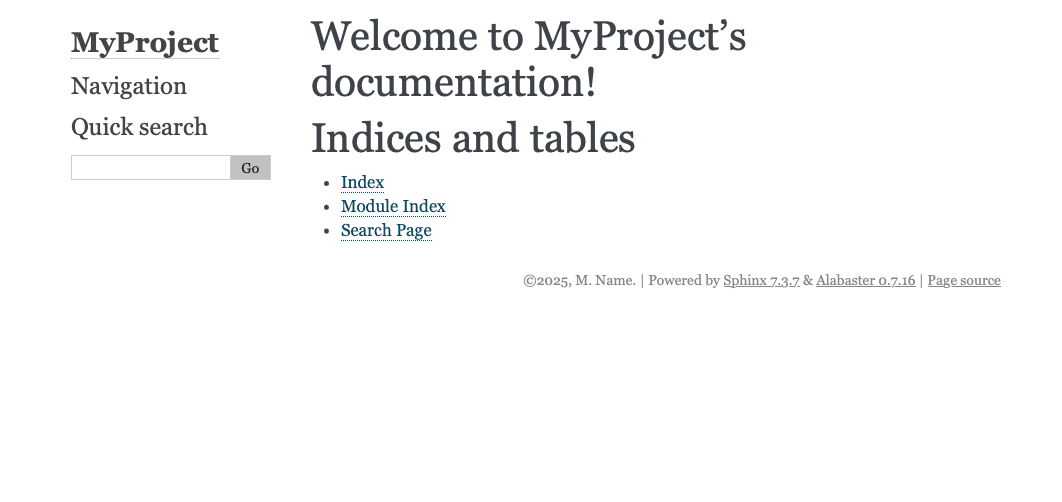
As it stands currently, this generates the default documentation:
To customise this, edit the index.rst file
Welcome to MyProject's documentation!
=====================================

.. toctree::
   :maxdepth: 2
   :caption: Contents:


Indices and tables
==================

* :ref:`genindex`
* :ref:`modindex`
* :ref:`search`
Other files relative to this one may be included by adding their
relative path to the Contents:. It is also possible to include
other files directly inside this using .. include:: file, or
markdown files with
.. include:: file.md
   :parser: myst_parser.sphinx_
which requires the myst_parser extension.
To generate documentation from the code, I recommend sphinx-apidoc
which builds the files for each module which may then be linked to.
Deploying to ReadtheDocs (RTD) requires a .readthedocs.yml file in the
main directory. The standard method is:
# .readthedocs.yml
version: 2

build:
  os: ubuntu-lts-latest
  tools:
    python: latest

sphinx:
  configuration: docs/conf.py
  fail_on_warning: false

python:
  install:
    - requirements: docs/requirements.txt
This tells RTD to use the latest Ubuntu image with the latest Python, to look for the
Sphinx conf.py file in docs/conf.py and install all requirements in
docs/requirements.txt using pip. With this setup, the project can be synced to
RTD, for which I recommend
their tutorial.
If (like me), you prefer a Conda environment or your project requires packages not
available on pip. Then it is possble to setup readthedocs.yml to use
Mamba (Conda).
This can be done using:
# .readthedocs.yml
version: 2

build:
  os: ubuntu-lts-latest
  tools:
    python: "mambaforge-latest"

conda:
  environment: docs/environment.yml

sphinx:
  configuration: docs/conf.py
This requires a Conda environment file of the form:
name: RTDbuild
channels:
 - conda-forge
dependencies:
  - python==3.12
  - sphinx>=4.5.0
  - sphinx-rtd-theme>=1.3.0
This method may have more overhead than using pip but is useful, particularly for
non-Python projects.
To build documentation for C++, the best tool is Doxygen. Assuming a directory structure
.
├── CMakeLists.txt
├── README.md
├── docs
├── include
│   └── libexample.hpp
└── src
    └── example.cpp
There are a number of ways to use doxygen, such as with CMake. However, the simplest way
is with a Doxyfile. To generate this, run
doxygen -g
which creates a file Doxyfile in the current directory. This file is nearly 3000
lines long (mostly comments) and contains all the default settings for Doxygen.
The main ones to change are:
// Doxyfile
PROJECT_NAME           = MyCPPProject
PROJECT_NUMBER         = 0.1.0
PROJECT_BRIEF          = "An example C++ project"
OUTPUT_DIRECTORY       = docs/_doxygen
INPUT                  = src/ include/
GENERATE_XML           = YES
FILE_PATTERNS          = *.hpp *.h
RECURSIVE              = NO
EXCLUDE_PATTERNS       =
Of these, the input and output directories are the most important for generating
standard doxygen output and must be specified relative to the Doxyfile. The default
version looks for many file patterns but if you only want header files documented,
then other files should be removed. This configuration will search the src/ and
include/ but not subdirectories. Setting RECURSIVE = YES will search directories
recursively but EXCLUDE_PATTERNS may be needed to exclude directories.
Once this file is finalised, running
doxygen Doxyfile
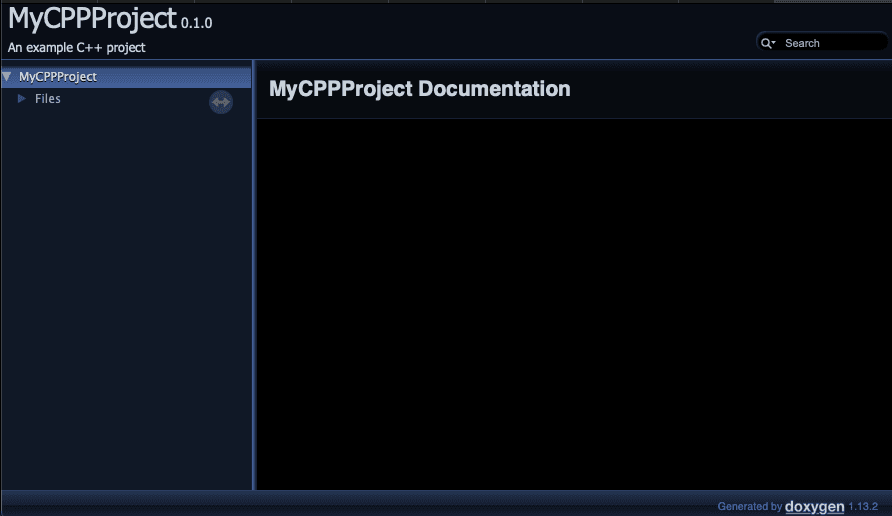
will generate the documentation in docs/_doxygen. Opening docs/_doxygen/html/index.html
will display the documentation index.
Now that the doxygen documentation has been built, it can be included in Sphinx
documentation. Assuming the Sphinx documentation has been setup as before and the Doxyfile as above in docs, the project
directory should look like:
.
├── Doxyfile
├── README.md
├── docs
│   ├── Makefile
│   ├── _build
│   ├── _doxygen
│   ├── _static
│   ├── _templates
│   ├── conf.py
│   ├── index.rst
│   └── make.bat
├── include
│   └── libexample.hpp
└── src
    └── example.cpp
To translate the Doxygen to Sphinx requires
Breathe.
Which may be used by modifying the conf.py file
to
project = 'MyCPPProject'
copyright = '2025, M. Name'
author = 'M. Name'
release = '0.1.0'

extensions = [
    "breathe",
    "sphinx_rtd_theme"
]

breathe_projects = {
    "MyCPPProject": "_build/_doxygen/xml/",
}

breathe_default_project = "MyCPPProject"

templates_path = ['_templates']
exclude_patterns = ['_build', 'Thumbs.db', '.DS_Store']

html_theme = "sphinx_rtd_theme"
html_static_path = ['_static']
C++ functions, classes, structs, etc. can then be included in the Sphinx documentation using the various Breathe directives.
Consider the header file:
// libexample.hpp
#ifndef LIBEXAMPLE_HPP
#define LIBEXAMPLE_HPP

/// @brief An example namespace
namespace example {

/// @brief An example class
class ExampleClass
{
private:
    /// @brief Some private data
    int data;
public:
    /// @brief Class initialiser
    /// @param value Value to be stored
    ExampleClass(const int value) : data(value) {};

    /// @brief Class deconstructor
    ~ExampleClass() {};
};

/// @brief An example function
/// @param a Value a
/// @param b Value b
/// @return Sum of a and b
int add(const int a, const int b) {
    return a+b;
}

}

#endif // LIBEXAMPLE_HPP
then these docstrings can be included in the Sphinx
index.rst using
.. doxygenclass:: example::ExampleClass
   :members:

.. doxygenfunction:: example::add
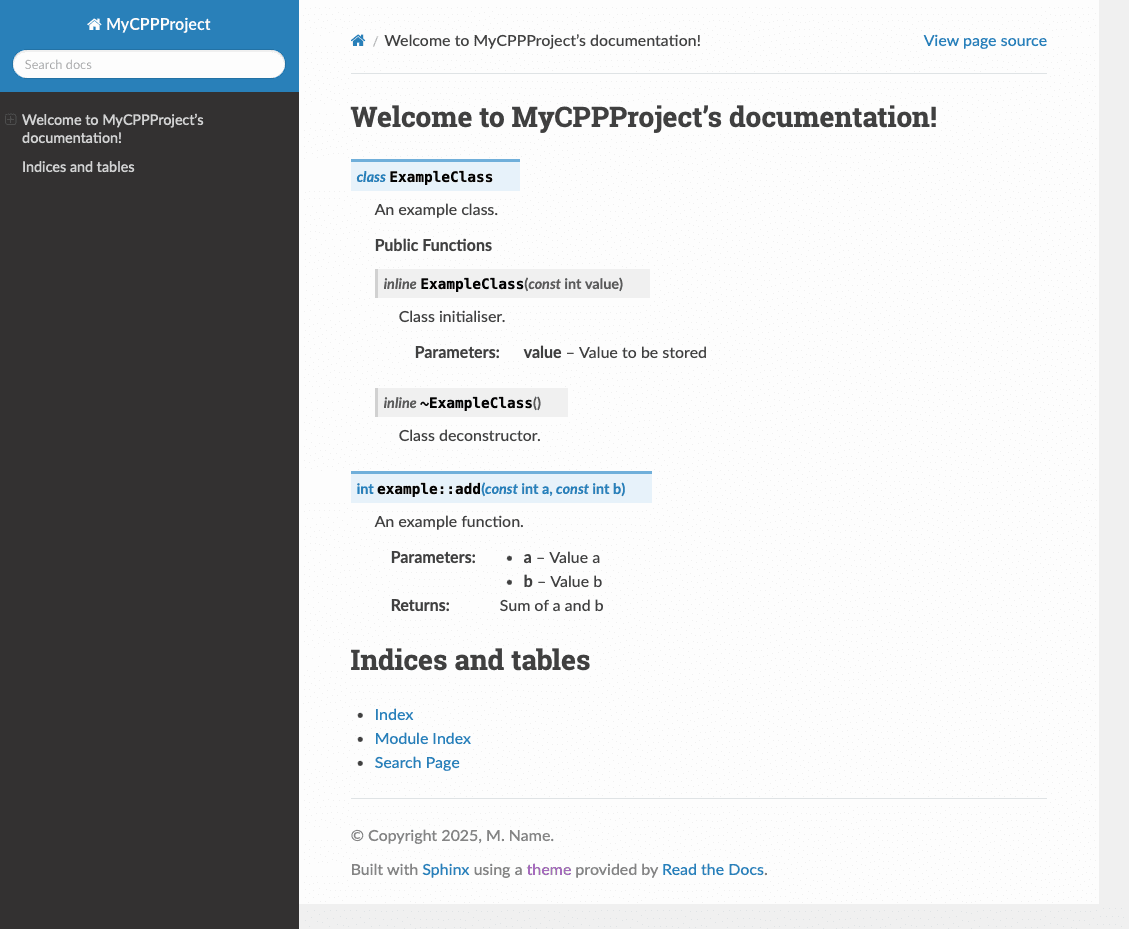
Running the Sphinx build command results in:
This can then be deployed to ReadtheDocs in the same way as a standard
Python project (above), making sure to include Breathe in the project
dependencies. However, the Doxygen command will have to be run before the
Sphinx-build command, this can be added to the workflow by changing the
build section in .readthedocs.yml to:
build:
  os: ubuntu-lts-latest
  tools:
    python: latest
  jobs:
    pre_build:
      - doxygen Doxyfile
This will build the Doxygen documentation before the predefined build command
runs sphinx.
Breathe reads in the Doxygen, Exhale outputs it. I'm starting to sense a theme with these names! Above, we used Breathe to read the Doxygen documentation and used the provided directives to include the documentation in our files. The Exhale package automates the process of adding the documentation to Sphinx, creating its own files which can be included in the index.
Install Exhale and add it to the project dependencies list. Then edit the conf.py
file to include:
extensions = [
    "breathe",
    "exhale",
    "sphinx_rtd_theme"
]

breathe_projects = {"MyCPPProject": "./_doxygen/xml/"}
breathe_default_project = "MyCPPProject"

exhale_args = {
    # These arguments are required
    "containmentFolder": "./api",
    "rootFileName": "library_root.rst",
    "doxygenStripFromPath": "..",
    "rootFileTitle": "MyCPPProject API",
    # Suggested optional arguments
    "createTreeView": True
}
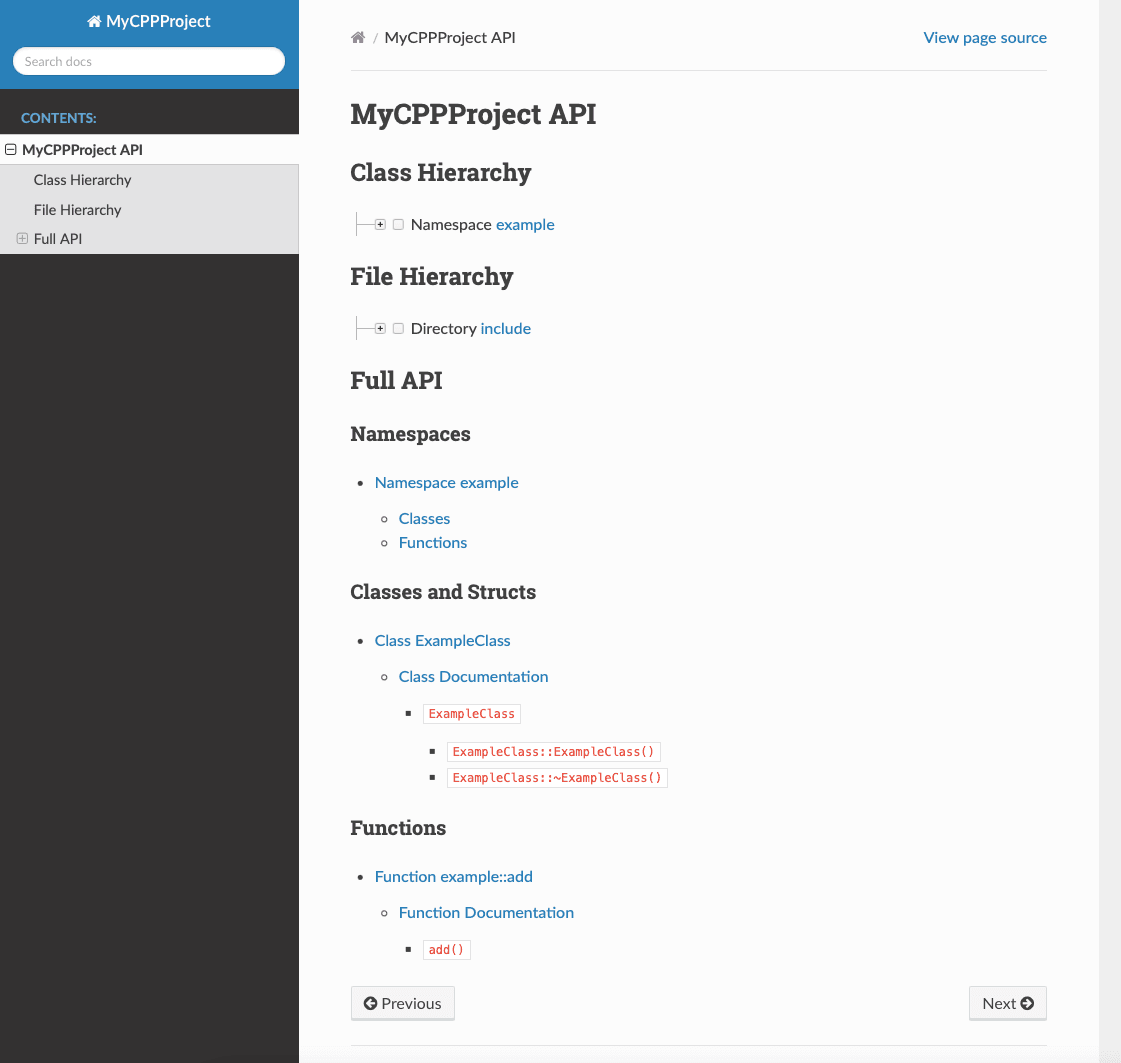
This scans the Doxygen XML documentation in docs/_doxygen/xml and generates the
Breathe directives as before. Exhale then uses these to generate new API documentation
in docs/api, with the root file library_root.rst titled MyCPPProject API.
In order to include this generated documentation, simply add api/library_root to
the contents list in index.rst.
It is also possible to use Exhale to generate the Doxygen documentation itself.
This removes the need for a separate Doxyfile and the pre_build step in
.readthedocs.yml. By setting
exhale_args = {
    "containmentFolder": "./api",
    "rootFileName": "library_root.rst",
    "doxygenStripFromPath": "..",
    "rootFileTitle": "MyCPPProject API",
    "createTreeView": True
    "exhaleExecutesDoxygen": True,
    "exhaleDoxygenStdin": textwrap.dedent("""
    INPUT = ../src/ ../include/
    FILE_PATTERNS = *.hpp *.h
    """)
}
Exhale will automatically run the Doxygen build step without the
Doxyfile and place the output in the xml in the directory
where Breathe expects to find the documentation. The command
exhaleDoxygenStdin represents the Doxyfile and can be used to
edit any argument as previously, though some of reserved by
Exhale (e.g. OUTPUT_DIRECTORY).
In this guide, we have built documentation for Python with Sphinx, documentation for C++ with Doxygen, and shown how to use Breathe and Exhale to get Doxygen documentation into Sphinx so that it can be uploaded to ReadtheDocs.